> note
Cisco Nexus HyperFabric Deep Dive
In this note · 11 sections
Cisco opens with three complaints about what exists today. That it is too complex, because you cannot deploy or run it without a controller. That it is too fragile, because a tangled configuration cannot be changed without re-architecting. And that it is too hard to automate: in their own words, current technologies force the automation engineer to be a CCIE.
The ground shifted at the same time. Workloads are coming back from the cloud, though usually for specific purposes, and instead of two or three large data centres people are now standing up plenty of small ones spread across more locations.
Nexus HyperFabric aims at that. It is not a lighter NX-OS, nor ACI wearing a different face. It is a fabric delivered as a service: design and observation live in a Cisco cloud, and the data plane lives where it always did, in the switches. This note goes through what sits underneath.
The hardware#
Three models in the 6000 Series, plus one new arrival worth reading twice.
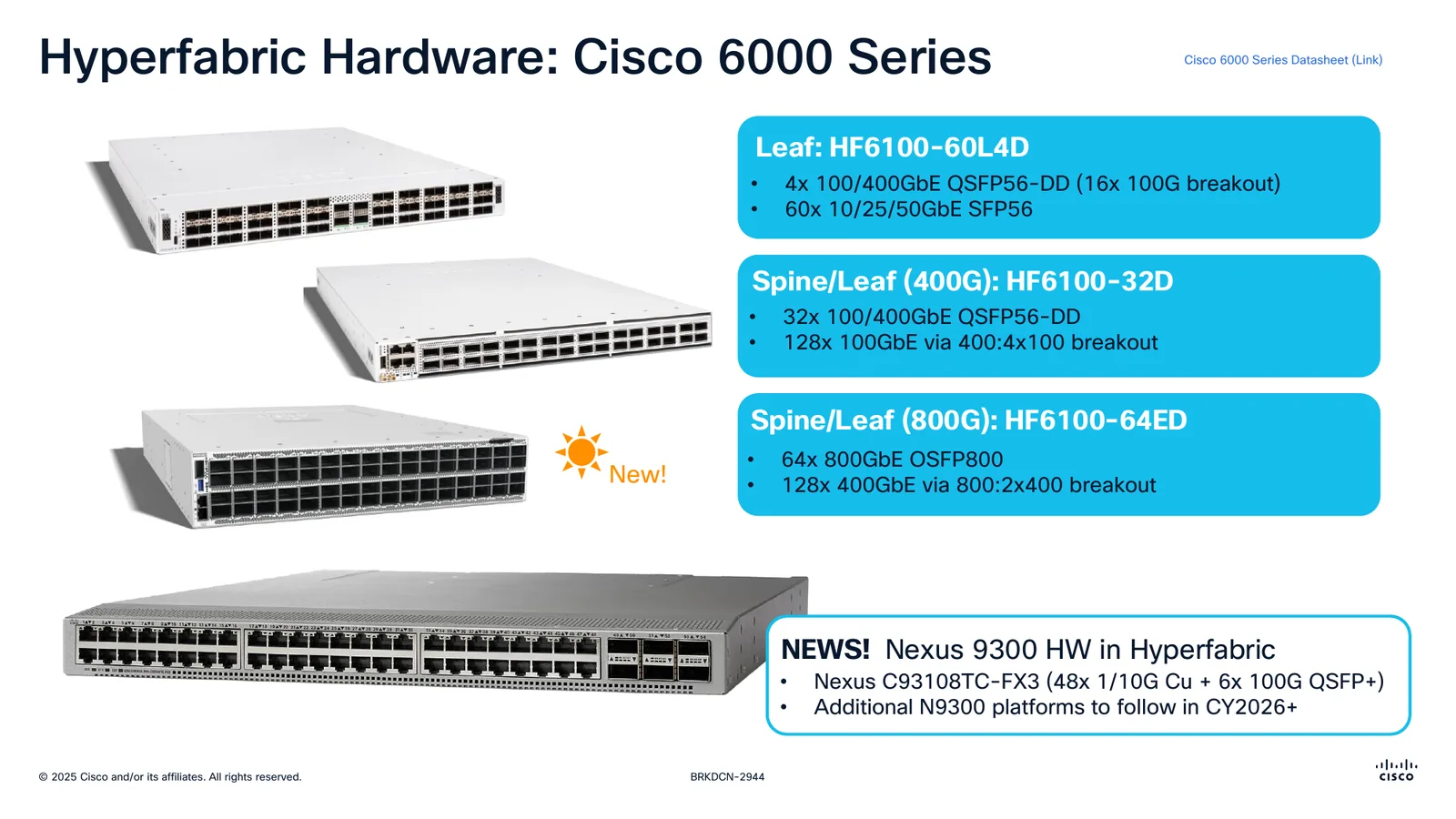
Slide from session BRKDCN-2944 at Cisco Live (Dan Backman, Michael Petrinovic). © Cisco.
| Model | Role | Ports |
|---|---|---|
HF6100-60L4D |
Leaf | 60× 10/25/50G SFP56 · 4× 100/400G QSFP56-DD (16× 100G breakout) |
HF6100-32D |
Spine or 400G leaf | 32× 100/400G QSFP56-DD · 128× 100G via 400:4×100 breakout |
HF6100-64ED |
Spine or 800G leaf | 64× 800G OSFP800 · 128× 400G via 800:2×400 breakout |
The HF6100-60L4D leaf runs on Broadcom Q200 silicon. It is a 1RU top-of-rack box with two power supply slots and six fan trays.
The new part is that Nexus 9300 hardware has started to appear inside HyperFabric. The first one is the C93108TC-FX3, with 48 ports of 1/10G copper and 6× 100G QSFP+, and Cisco announced further N9300 platforms for CY2026 onwards. Keep an eye on that if you have copper to connect, because every 6000 Series box is fibre.
It scales down, not just up#
The interesting thing about HyperFabric is not how far it grows. It is how far it shrinks.
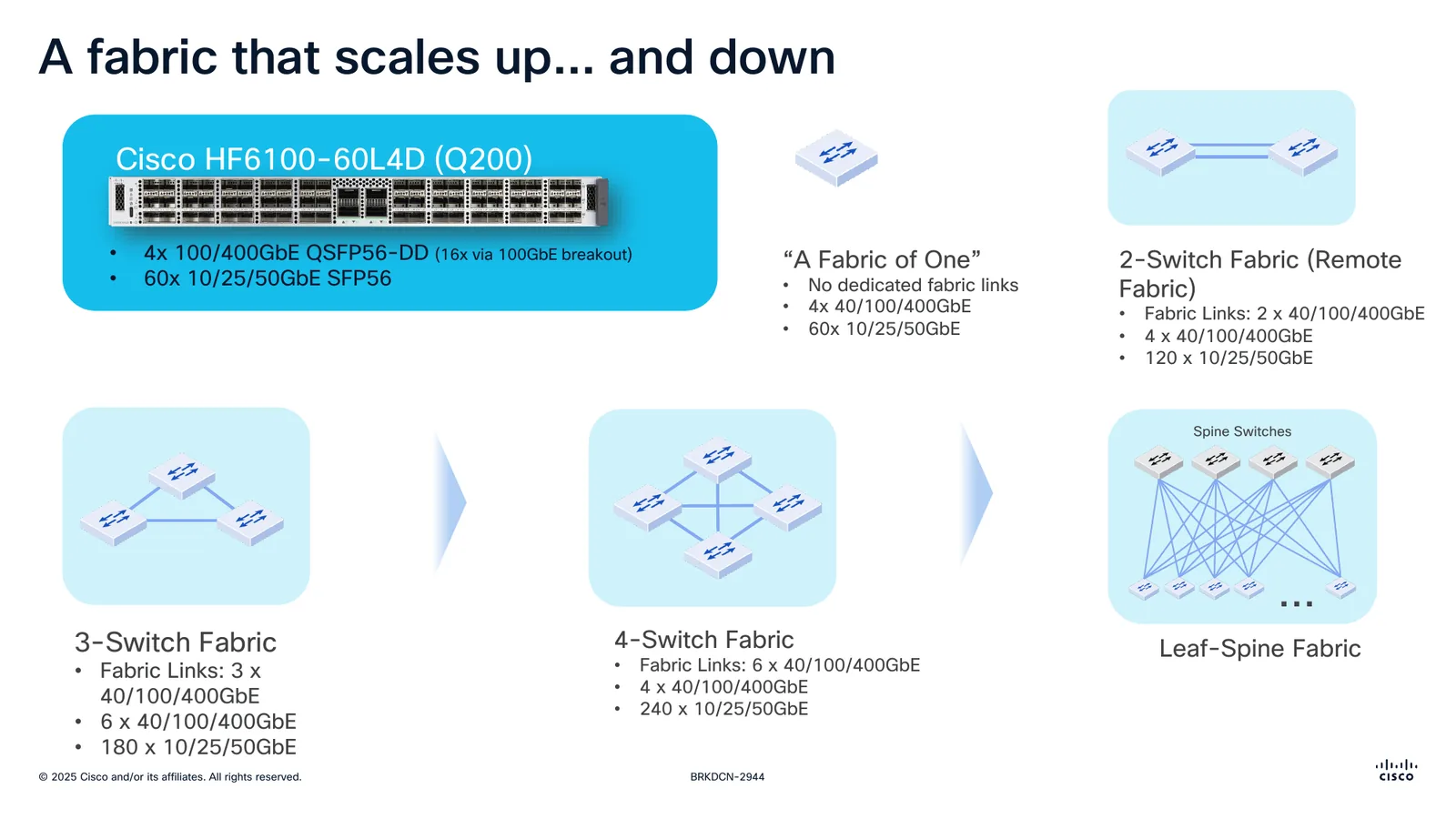
Supported topologies. Slide from BRKDCN-2944. © Cisco.
Cisco documents a topology it calls "a fabric of one": a single switch with no dedicated fabric links, offering 4× 40/100/400G and 60× 10/25/50G. From there come two switches for a remote fabric, then three, then four, and only then the classic leaf-spine.
A four-switch fabric gives you 6 fabric links, 4× 40/100/400G and 240× 10/25/50G. For a large branch or a colo, that is more than enough.
The good part is that growth happens in service. The promise is to start as a full mesh and reach leaf-spine, and later super-spine, changing size and topology with no re-architecture and no maintenance window.
The underlay configures itself#
This is the heart of the product, and there is nothing magical about it. There is a sequence.
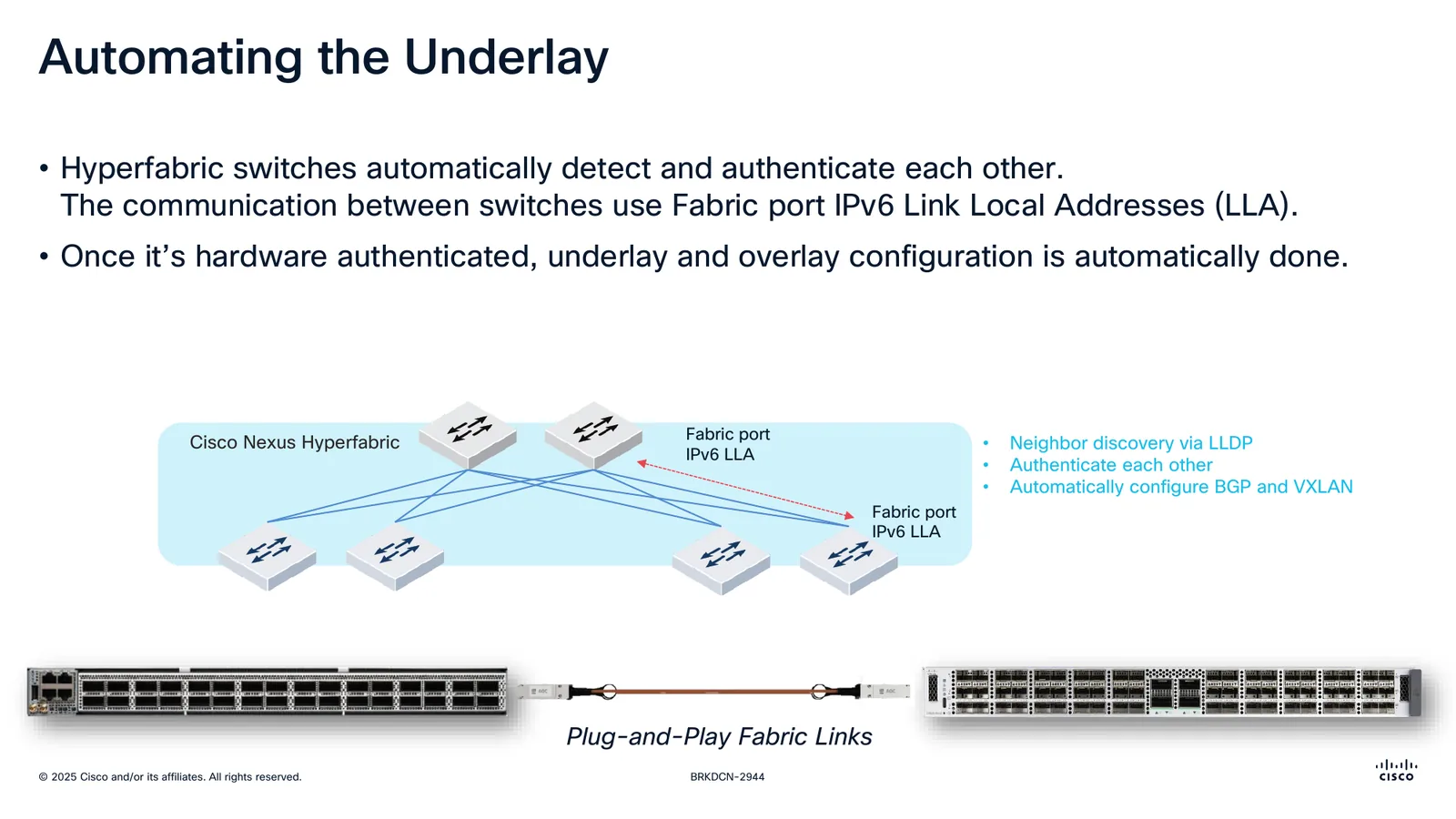
Underlay automation. Slide from BRKDCN-2944. © Cisco.
- Switches discover each other over LLDP and authenticate in hardware.
- They talk to each other using IPv6 link-local addresses on the fabric ports. There is no underlay addressing to plan or to document.
- Once authenticated, underlay and overlay configuration happens on its own. BGP and VXLAN come up without anyone touching a thing.
The switch's telemetry agent opens an outbound TLS connection to the controller. Nothing needs to be opened inbound, which settles half the conversation with the security team before you even start.
When the switch lands on site and gets plugged in, it connects by itself and waits for someone to claim it. Its default hostname is its serial number. The status screen shows the IP, static or via DHCP, the DNS with an asterisk marking that it is answering, the cloud URL already preconfigured, the proxy if you need one, the connection state and the claim code. The token refreshes itself every few minutes.
The question everybody asks#
A fabric whose controller lives outside always draws the same objection: what if the internet goes down? The answer is worth quoting precisely, because it is rather better than you would assume.
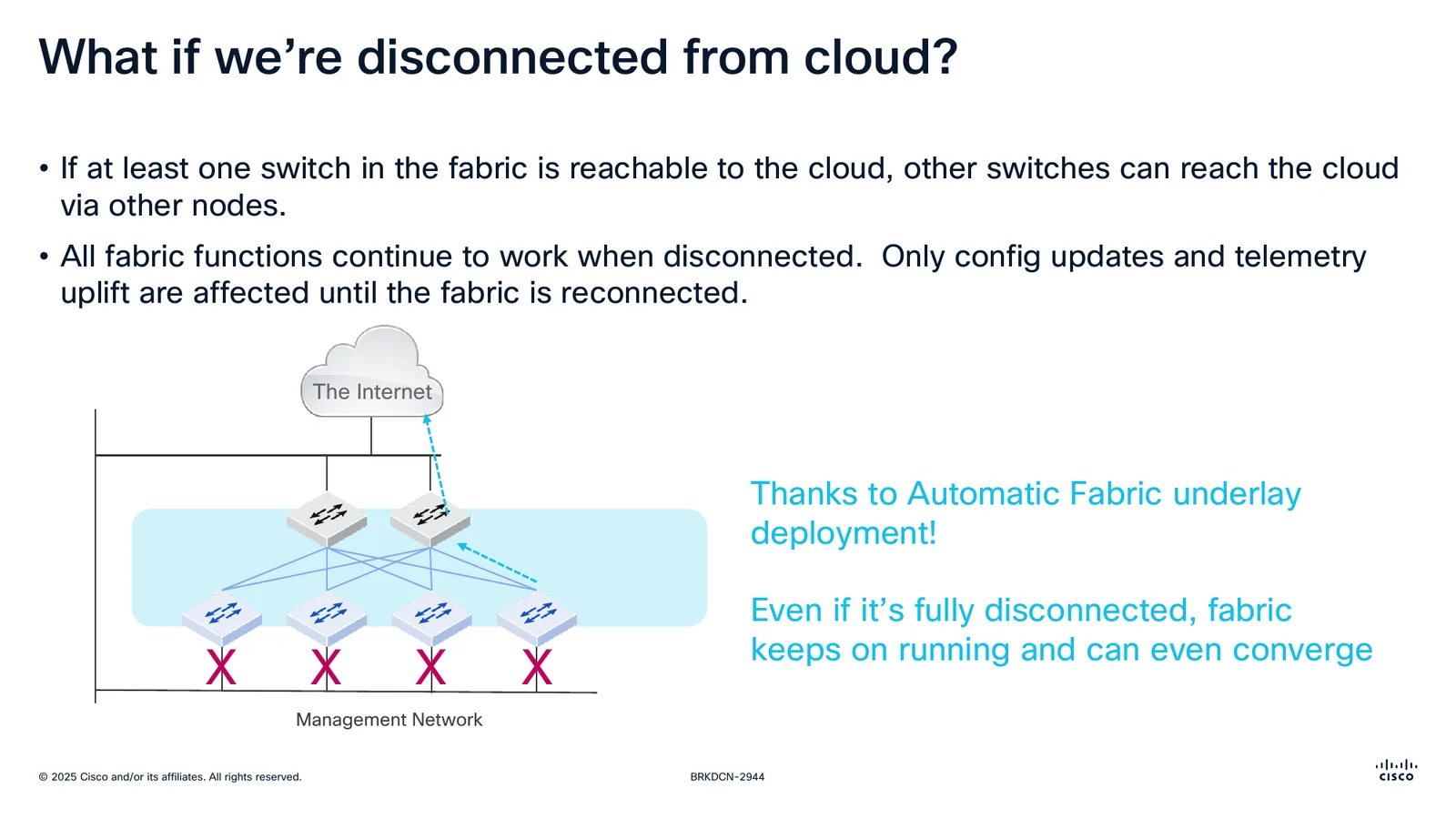
Behaviour without a controller connection. Slide from BRKDCN-2944. © Cisco.
- If at least one switch in the fabric can reach the cloud, the rest get there through it.
- While disconnected, every fabric function keeps working. The only things affected are configuration updates and telemetry upload, until it reconnects.
- Even fully disconnected, the fabric keeps forwarding and can converge.
That fits with what came before: the underlay deployed itself and lives in the switches. The cloud is where you design and where you look, not where the traffic goes.
What you do lose for the duration of the outage is the ability to change the network. For a fabric that is isolated by design, say an industrial plant or a classified environment, that is not a detail. That is the whole conversation.
The lifecycle, day 0 to day 2#
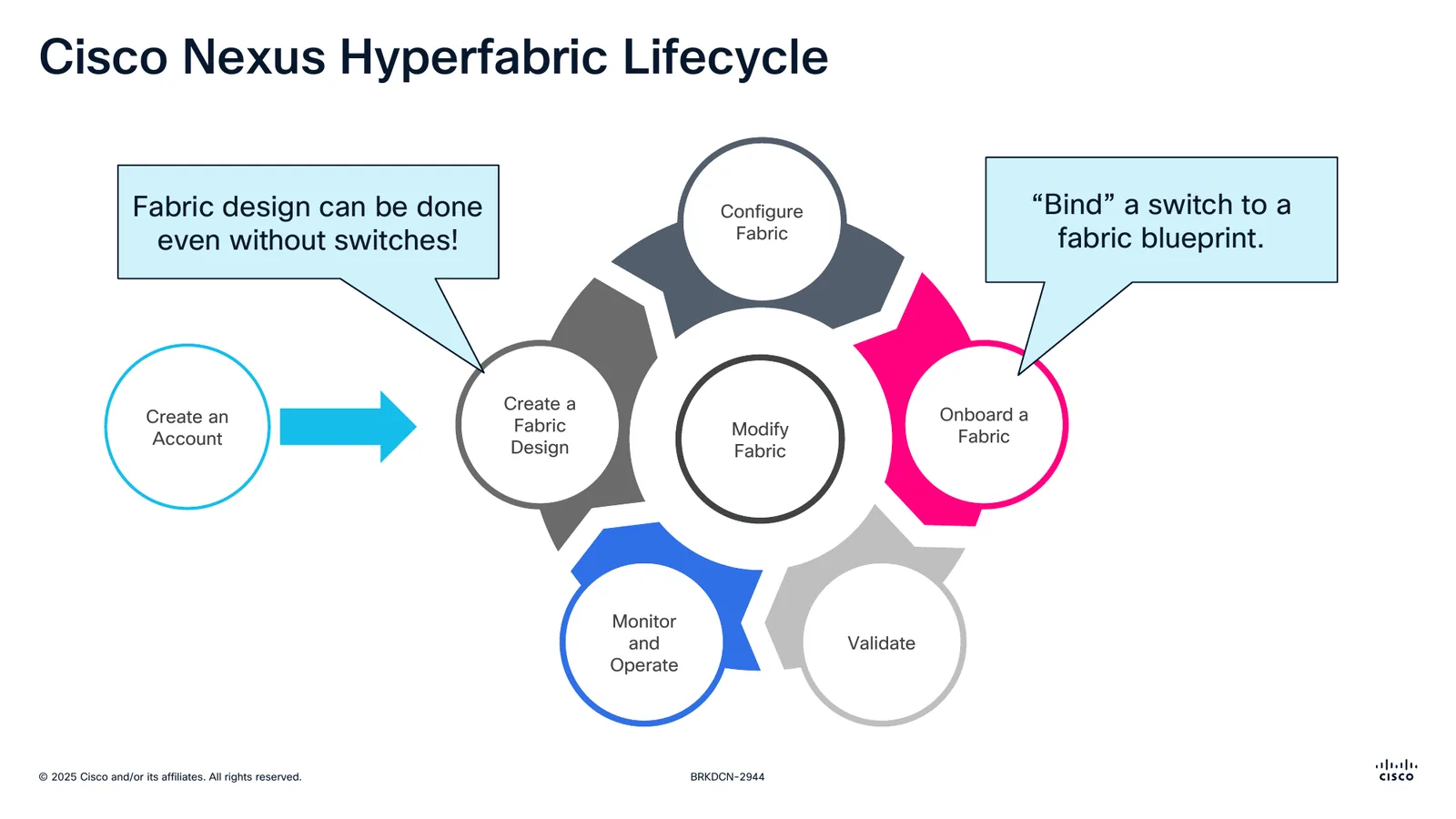
Lifecycle. Slide from BRKDCN-2944. © Cisco.
You can design the fabric without having the switches. You create the account, design the fabric in the portal, and out of it comes a bill of materials with the total switch and optics count, plus the per-switch detail, which hooks into CCW to generate the quote. In other words, you size it before you buy it, with the same tool.
On day 1 the kit arrives, gets plugged in and registers against the fabric. Two pieces show up here that you do not see in other products.
The first is that the fabric documents itself. The design is the documentation, not a Visio that ages off to one side.
The second is the remote hands interface: a URL you hand to whoever is physically on site, carrying the workflow and installation status, real-time task validation and coordination across several installers at once. For anyone who has run a deployment by phone from another time zone, that alone justifies a look at the product.
Software goes out by continuous delivery. The cloud updates itself, with no testing or version maintenance on the customer's side. You will either like that or you will not, but you should know it going in, because there is no such thing as "I am staying on the version I already validated".
Assertions, and why the latch matters#
HyperFabric does not work with alarms. It works with assertions, which are statements that have to be true for something to be green.
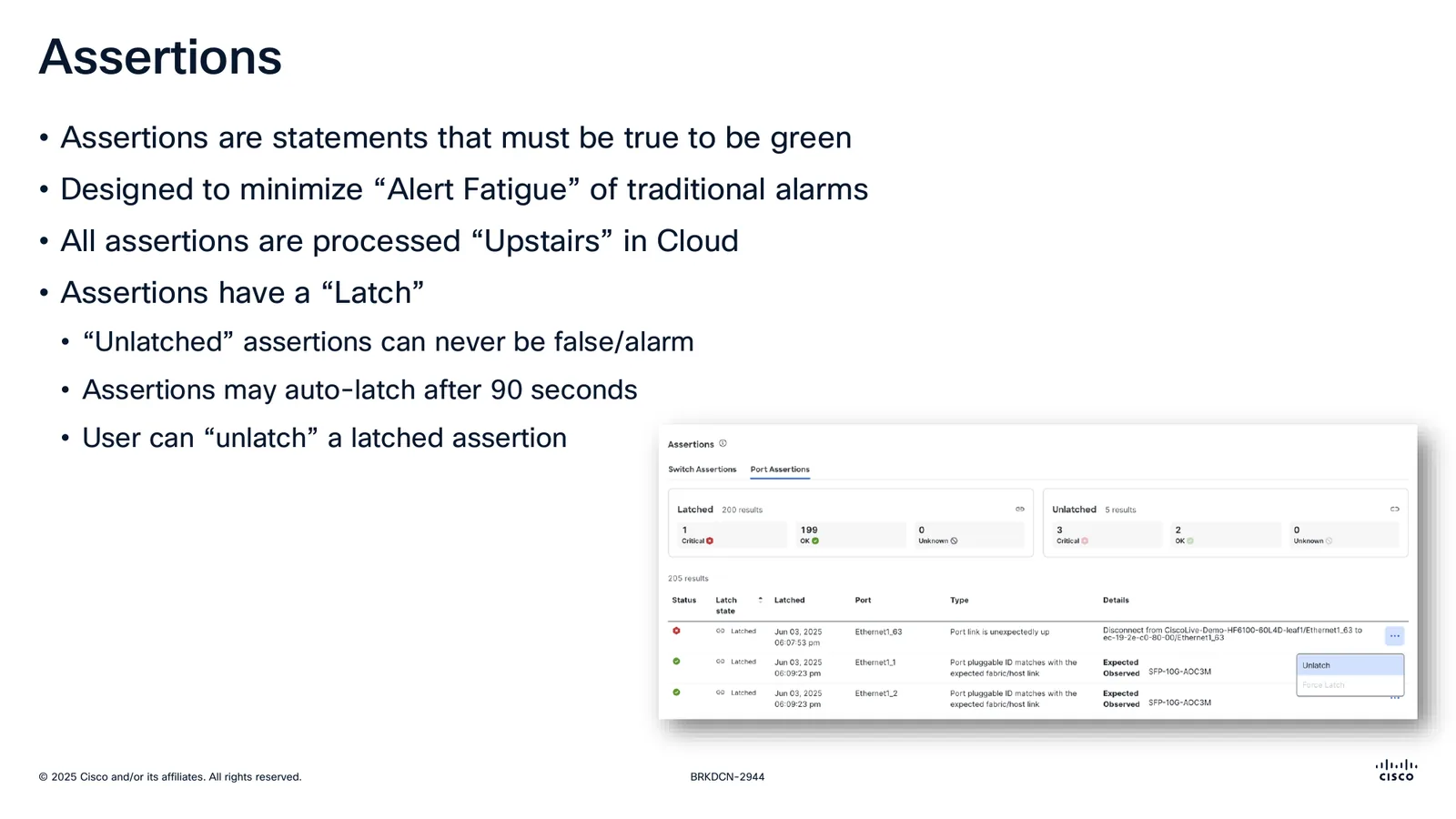
Assertions and their latch mechanism. Slide from BRKDCN-2944. © Cisco.
They cover four kinds of condition. Deviation from the blueprint, for instance the interface being wired to port 3 when the design said port 2. End devices or neighbourships not behaving as expected. Routing and next-hop validation via IP SLA. And finally custom intent, along the lines of "this VLAN has traffic" or "this BGP neighbour is learning X routes", which landed after the first release.
All of them are processed in the cloud, not on the switch. And they carry a latch:
- An unlatched assertion can never raise an alarm.
- It auto-latches after 90 seconds.
- Whoever is operating can unlatch it.
It is an explicit mechanism against alert fatigue: as long as a condition has not held over time, it bothers nobody. That is a more interesting design decision than most of the dashboards doing the rounds.
Telemetry covers port state and traffic statistics, counters and link information, per-switch sensors such as fans and power supplies, and optics DOM. Splunk integration for events and notifications was announced for the first quarter of 2026.
Multi-site: EVPN Border Gateway#
Connecting fabrics is not an improvised tunnel. It runs on EVPN Border Gateway, the same model as VXLAN EVPN Multi-Site.
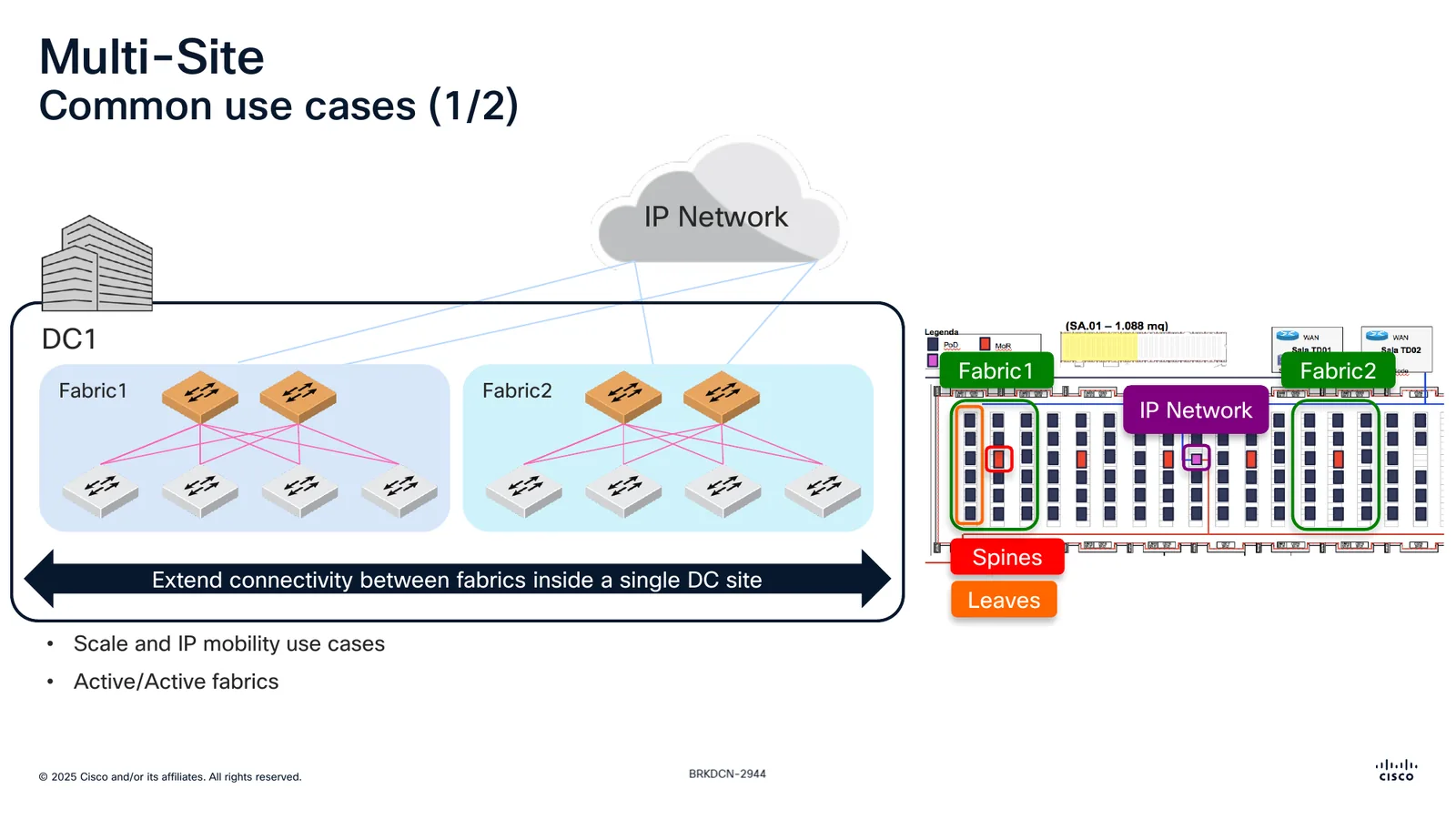
Multi-site over EVPN Border Gateway. Slide from BRKDCN-2944. © Cisco.
What the Border Gateway enables:
- Connecting remote fabrics across third-party IP networks.
- Hiding fabric complexity from peers.
- Native EVPN/VXLAN connectivity.
- Policy control over L2VNI and L3VNI routes.
- Enforcing an ownership boundary between fabrics.
There are two distinct overlays, the local one inside the fabric and the multi-site one between BGWs, with VNID translation between them: a network that is local VNI 100001 inside the fabric leaves as global VNI 300001. The anycast gateway can exist on both fabrics at once, which is exactly what makes the IP mobility and active/active cases work.
Cisco puts forward two uses. Extending connectivity between fabrics inside a single site, for scale, IP mobility and active/active. And extending it between sites, for disaster recovery, active/active and active/standby.
There is also a strategic signal people skip past: Cisco presents multi-site as the native peering model for "Nexus One", with BGWs connecting ACI fabrics, NX-OS VXLAN EVPN fabrics, HyperFabric and HyperFabric AI in the same picture. That is where the catalogue is heading.
HyperFabric AI#
The variant for AI infrastructure deserves its own section, mostly because of one slide that puts numbers on something usually argued in the abstract.
A "small" training cluster, around 5 million dollars, with 12 UCS servers, 96 GPUs and storage, comes out like this:
112x  fabric links 800/400G
 96x  backend links 400G
 48x  frontend links 400G
189x  management links 1/10G
────
445   links in total  ·  980 optics
Nine hundred and eighty optics. That number on its own explains why the bill of materials and the remote hands interface exist. At that scale a human cabling mistake is not a possibility, it is a statistical certainty, and assertions against the blueprint are what catch it.
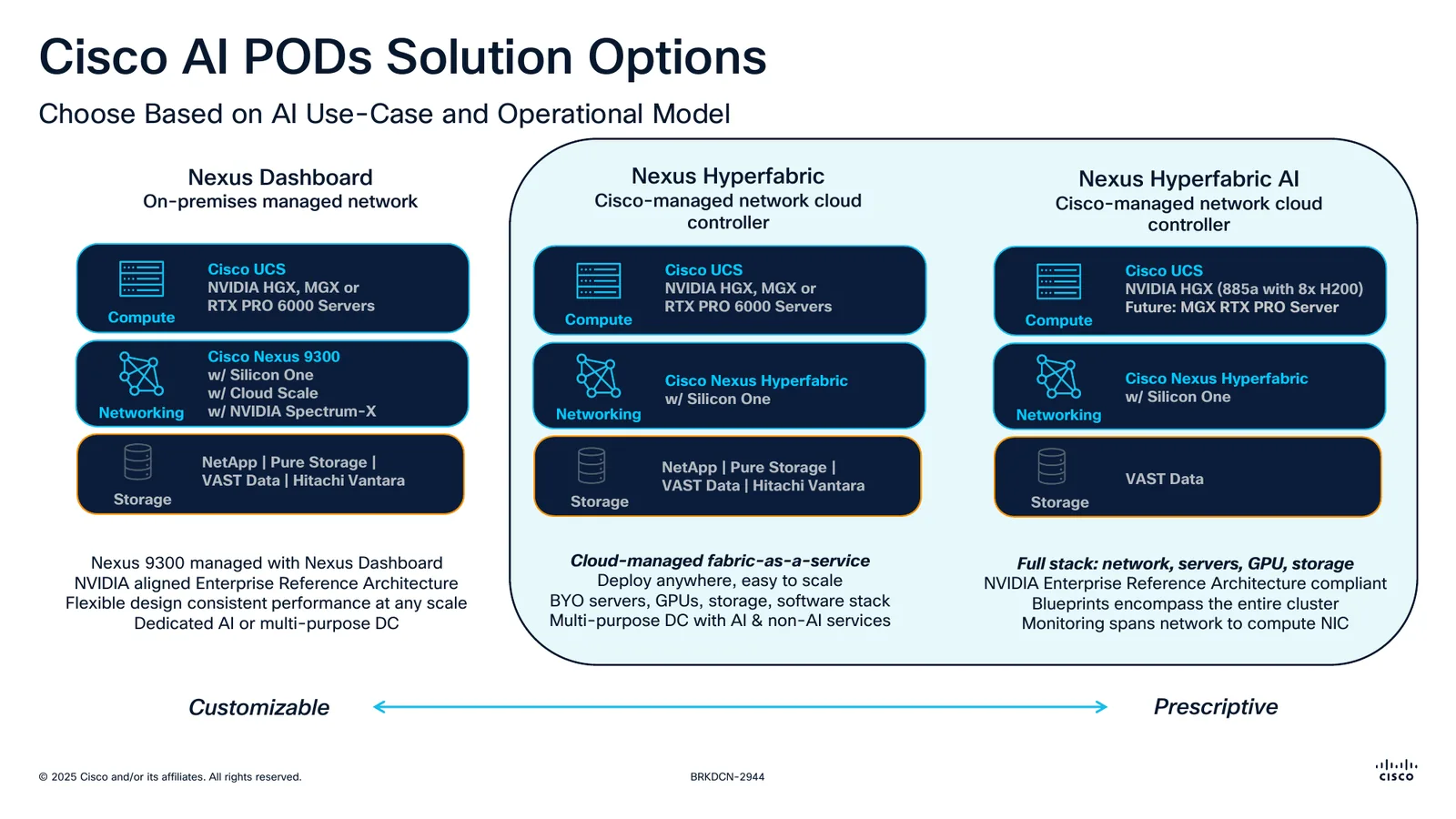
The two routes to an AI POD. Slide from BRKDCN-2944. © Cisco.
Cisco offers two ways to build an AI POD, and what separates them is the operating model:
| Nexus Dashboard | Nexus HyperFabric | |
|---|---|---|
| Network managed | On premises | Controller in the Cisco cloud |
| Compute | UCS with NVIDIA HGX, MGX or RTX PRO 6000 | The same |
| Network | Nexus 9300 with Silicon One, Cloud Scale, NVIDIA Spectrum-X | HyperFabric with Silicon One |
| Storage | NetApp, Pure Storage, VAST Data, Hitachi Vantara | The same |
| Fits | A dedicated AI DC or a general-purpose one | A general-purpose DC, with AI and non-AI services |
The unified HyperFabric AI stack includes NVIDIA AI Enterprise, and the sales line is standing up clusters with a single click.
The roadmap#
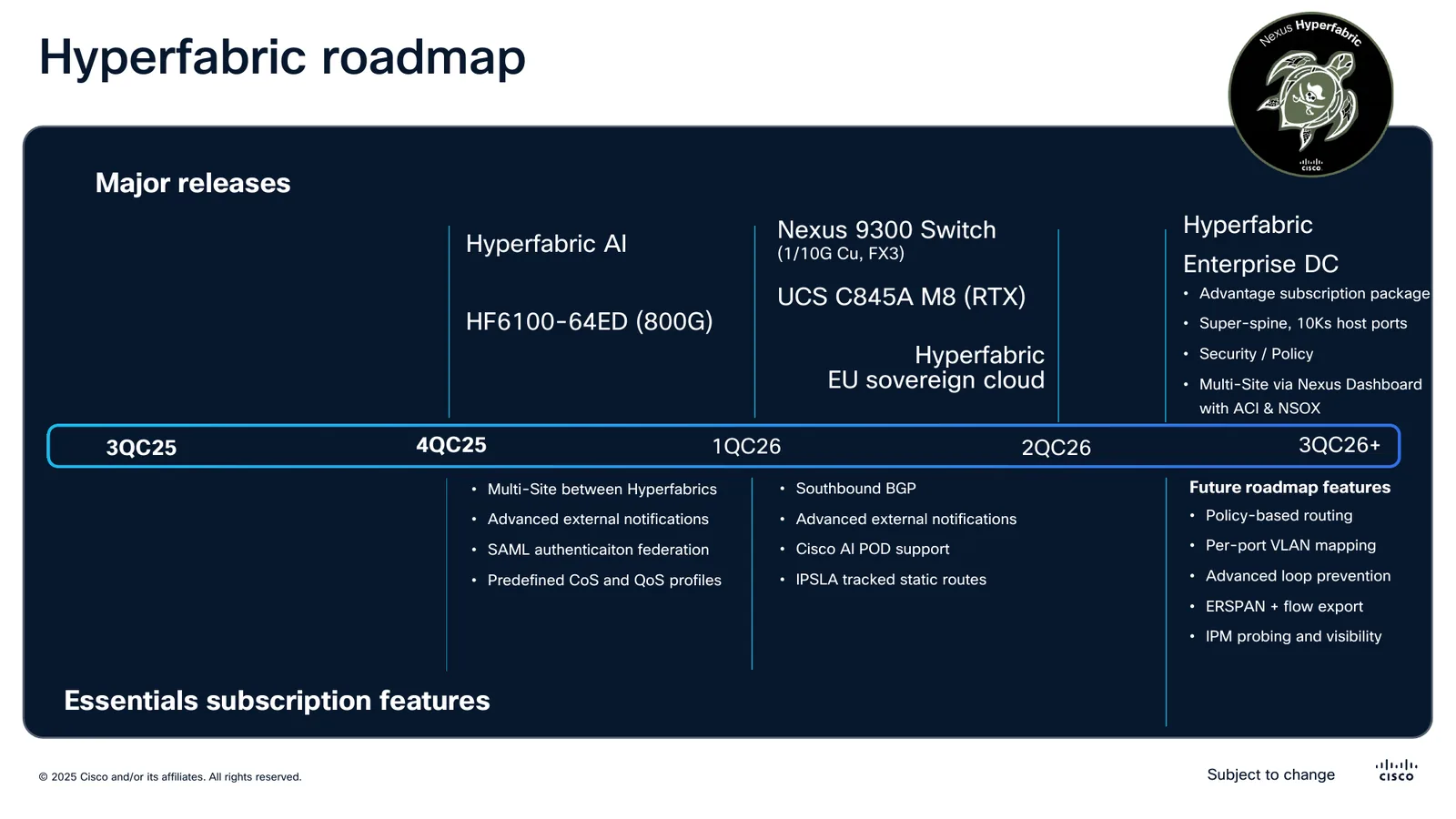
Roadmap as presented in the session. Slide from BRKDCN-2944. © Cisco.
What has shipped and what has been announced, by quarter: HyperFabric AI and the 800G HF6100-64ED, plus multi-site between HyperFabrics, advanced external notifications, SAML authentication federation and predefined CoS and QoS profiles. After that come the 1/10G copper Nexus 9300, the UCS C845A M8, EU data sovereignty, and IP SLA.
Like every roadmap shown at a conference, this is intent and not commitment. It is useful for knowing what to ask, not for planning on top of.
What to ask before committing#
- Can your data centre depend on internet access in order to change the network? Traffic survives the outage; changes do not. If the answer is no, this product is not for you, and that is fine.
- Where is your telemetry processed? Assertions are evaluated in the cloud. Anyone with data residency requirements has to settle that first. European sovereignty appears on the roadmap, which in practice means it is not there yet.
- Does continuous delivery work for you? There is no "I am staying on the version I validated". For plenty of environments that is a relief; for others it is a certification problem.
- What about what you already have installed? Multi-site connects to ACI and to NX-OS VXLAN EVPN through Border Gateway, but that is interconnection, not unified management.
- Do you have copper? Until the
C93108TC-FX3arrived, the answer was fibre or nothing.
Source#
Everything above comes from BRKDCN-2944, Understanding Hyperfabric, presented by Dan Backman and Michael Petrinovic at Cisco Live 2025, plus the 6000 Series hardware documentation. The slides reproduced here are from that session and are Cisco's property. They are included for technical commentary, with the source noted on each one.
The full session is worth your time. It carries five video demonstrations that cannot be reproduced here and that show the portal in motion, which is where you really get a sense of whether a product like this convinces you.